Picard 3 Release Candidate 3

Today the Picard team is making available a third release candidate for Picard 3. We received good feedback on the previous release candidate 2, thanks to everyone for testing and providing feedback. The final 3.0 release is planned to happen in a few weeks.

Please test, test, and test, report any issue on forums, matrix, or, ideally, on the ticket system.

When reporting an issue, always provide details about your environment and a full debug log helps us a lot.
Also that’s (always) a good time to review and improve translations.

Download links and a detailed list of changes since Picard 3 release candidate 2 are available below. For a more detailed overview of what is new in Picard 3 please see the previous blog post Picard 3 Alpha Release.

While we have all the major features implemented and with the latest bug fixes we are confident in the current code, this is still a pre-release and there might be bugs. If you use this, do so with care, backup your files and please report any issues you encounter.

If you are updating from Picard 2, note that some of the changes are backward incompatible, hence we recommend you make a backup of your Picard.ini config file before trying this version. You can do so in Picard’s Options under Advanced > Maintenance.

Continue reading “Picard 3 Release Candidate 3”

Picard 3 Release Candidate 2

Today the Picard team is making available a second release candidate for Picard 3. We received good feedback on the previous release candidate 1, thanks to everyone for testing and providing feedback. The final 3.0 release is planned to happen in a few weeks.

Download links and a detailed list of changes since Picard 3 release candidate 1 are available below. For a more detailed overview of what is new in Picard 3 please see the previous blog post Picard 3 Alpha Release.

While we have all the major features implemented and with the latest bug fixes we are confident in the current code, this is still a pre-release and there might be bugs. If you use this, do so with care, backup your files and please report any issues you encounter.

If you are updating from Picard 2, note that some of the changes are backward incompatible, hence we recommend you make a backup of your Picard.ini config file before trying this version. You can do so in Picard’s Options under Advanced > Maintenance.

Continue reading “Picard 3 Release Candidate 2”

The super special (lousy) shirt plan

Editors are by far MetaBrainz’ biggest and most irreplaceable resource.

They (you) spend countless hours entering data for free, be it for the love of music, to tidy their own collections and listen histories, to support their scenes, to archive historical and cultural data, to apply the cool and soothing editing brain-balm, or a combination of all of the above and more.

Some of the top editors have provided the backbone of MusicBrainz for years, decades, and often perform the more tedious data maintenance and checking tasks.

A few summits ago, the question was asked – can we give these editors, say those with 1 million+ edits, some recognition without getting into the quagmire of things like gamifying?

Enter super special (lousy) shirt plan.

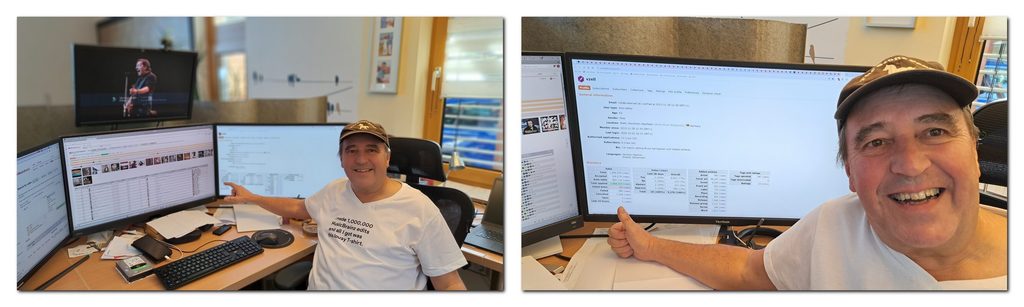
reo showcasing his super special lousy shirt – a real and rare image of a top MusicBrainz editor outside!?
Continue reading “The super special (lousy) shirt plan”

Picard 3 Release Candidate 1

The Picard team is excited to announce the first release candidate for Picard 3. With this release we are confident that Picard 3 is now suitable for testing by a wider audience. The final 3.0 release is planned to happen in a few weeks.

Since we are near a final release, we tried to focus on bugfixes, final changes to the Plugin API and further UI/UX improvements. On the UI side, Picard now fully supports dark / light mode across all supported operating systems, with the ability to change the theme without a restart.

Download links and a detailed list of changes since Picard 3 beta 9 are available below. For a more detailed overview of what is new in Picard 3 please see the previous blog post Picard 3 Alpha Release.

While we have all the major features implemented and with the latest bug fixes we are confident in the current code, this is still a pre-release and there might be bugs. If you use this, do so with care, backup your files and please report any issues you encounter.

If you are updating from Picard 2, note that some of the changes are backward incompatible, hence we recommend you make a backup of your Picard.ini config file before trying this version. You can do so in Picard’s Options under Advanced > Maintenance.

Continue reading “Picard 3 Release Candidate 1”

GSoC 2026: Compose Multiplatform Migration of ListenBrainz-Android

Hi everyone,

I’m Nirvan Jain (nirvan_jain on IRC, nirvan73 on GitHub), I’m currently a pre-final year student at IIIT Jabalpur. This summer I was offered this opportunity to work with MetaBrainz through Google Summer of Code on migrating the ListenBrainz android app to Kotlin Multiplatform and Compose Multiplatform, so that most of the same codebase can eventually run on iOS under the mentorship of Jasjeet Singh (jasje on IRC).

This post covers what the project was, everything I worked on, the parts that went wrong, what’s still left, and what the summer was actually like.

How I got here

I started contributing to ListenBrainz in December 2025. It was the first external open source project I’d worked on. Everything before that was coursework, side projects, or intra-college events.

My first PRs were small work which helped me a lot to understand the codebase from the ground, the shimmer effect across the Feed and Profile tabs, then extending search to cover playlists, artists, albums and tracks, plus some bug fixes. Small changes, but they taught me the codebase and how review works when nobody knows you and the code has to stand on its own.

I picked ListenBrainz because music is a constant in my day, whether I’m coding or not, and because I like that it treats your listening history as something you own.

The Problem

ListenBrainz has an Android app but no iOS version. A previous Swift attempt just duplicated the codebase, so every bug fix had to be written twice.

This project solves that by migrating to Kotlin Multiplatform, one shared codebase for both platforms. A large part of the work is replacing Android-only libraries with multiplatform equivalents across navigation, dependency injection and paging. Media playback is the harder case. ExoPlayer and WorkManager are tied too closely to Android to share, so both go behind common interfaces, with ExoPlayer on Android and AVPlayer on iOS underneath.

Getting this foundation right is what makes the rest cheap. Once it’s in place a feature or a bug fix is written once, instead of the same business logic being implemented twice and two apps being kept in sync by hand.

One thing genuinely can’t move. The notification listener that reads what’s playing in Spotify depends on an Android-only permission, and iOS has no equivalent to offer. Those screens stay Android-only. Everything else runs from one codebase on both platforms.

Continue Reading

GSoC 2026: Modernize search storage format for the MusicBrainz database

Hello Everyone!

I’m Junaid (fettuccinae), an undergraduate Computer Science student at MGIT in India. This summer, I returned to MetaBrainz for my second GSoC project, where I worked on modernizing the MusicBrainz search under the mentorship of @kartikohri13 and @bitmap.

Project Overview:

MusicBrainz uses Apache Solr for search queries.
The previous implementation serialized all the response data into a single _store field.
The response writers reads _store, unmarshal the XML into a MusicBrainz XML Metadata Format (MMD) object and then serialize it again as XML or JSON for the response.
Few problems with this design are:
1. The indexer must construct a complete XML representation for every document, even though much of the same information is already available in normal Solr fields.
2. Most of the response data is stored in an opaque _store XML blob.

This project focused on moving the fields from one _store XML blob into their own flat fields (and JSON strings for nested fields).

The main goals of this project were:
1. Upgrade the Solr schema version from 1.5 to 1.7
2. Add fields (in configsets and indexer) to store all the data to be returned
3. Create response writers to return data from fields

The proposal for this project can be found here.

Continue reading “GSoC 2026: Modernize search storage format for the MusicBrainz database”

Picard 3 beta 9 released

Today, we have released MusicBrainz Picard 3 beta 9. This new versions brings several fixes over the last beta 7 (yes, we have skipped a beta number again), but also improvements and some new features.

Since we are near a final release, we tried to focus on quality of life and UI/UX improvements, some changes in the UI are quite important (release preferences UI is a complete overhaul, and the new About dialog also got a nice refresh). Among the highlights are:

  • MetaBrainz OAuth2 support and various OAuth improvements and bug fixes
  • ISRC reading (from files or CD) and optional submission
  • Word diff for tags in the Metadata Box
  • UI/UX improvements: Redesign of some option pages, along re-organization and performance improvements
  • Plugin API improvements

Download links and a detailed list of changes since Picard 3 beta 7 are available below. For a more detailed overview of what is new in Picard 3 please see the previous blog post Picard 3 Alpha Release.

While we have all the major features implemented and with the latest bug fixes we are confident in the current code, this is still a pre-release and there might be bugs. If you use this, do so with care, backup your files and please report any issues you encounter.

Some of the changes are also backward incompatible, hence we recommend you make a backup of your Picard.ini config file before trying the beta version. You can do so in Picard’s Options under Advanced > Maintenance.

Continue reading “Picard 3 beta 9 released”

Picard 3 beta 7 released

Today, we have released MusicBrainz Picard 3 beta 7. This new versions brings several fixes over the last beta 5 (yes, we have skipped a beta number again), but also improvements and some new features. Among the highlights are:

  • Option profiles can now be exported and imported as TOML files. This makes sharing options much easier. We are excited to see how this will be used by you all.
  • Artist name standardization can now be set to one of three values: no standardization, standardizing only variations of the artist name (“Beatles” vs. “The Beatles”) or standardizing also actual artist name changes (“Diddy”, who previously performed under the names “P. Diddy” and “Puff Daddy”). Standardizing name variations is the new default setting. See also the documentation.
  • Plugins can now implement custom CD ripper log file support, and there is built-in support for Cyanrip log files.
  • Picard can now much better handles wrongly or differently encoded filenames when loading files.
  • The setup wizard got some improvements, allowing users to configure their update notification settings for the app and plugins. Also the setup wizard can now be started again from the help menu. This is not yet the final version of the wizard, but it’s getting closer.
  • The User Guide was updated to document the latest changes.

Download links and a detailed list of changes since Picard 3 beta 5 are available below. For a more detailed overview of what is new in Picard 3 please see the previous blog post Picard 3 Alpha Release.

While we have all the major features implemented and with the latest bug fixes we are confident in the current code, this is still a pre-release and there might be bugs. If you use this, do so with care, backup your files and please report any issues you encounter.

Some of the changes are also backward incompatible, hence we recommend you make a backup of your Picard.ini config file before trying the beta version. You can do so in Picard’s Options under Advanced > Maintenance.

Continue reading “Picard 3 beta 7 released”

Picard 3 beta 5 released

Today, we’re making available the fifth beta version for the upcoming MusicBrainz Picard 3. This new versions brings some important changes:

  • The Options menu was reworked with generalized quick settings and easier access to scripts and options.
  • Handling of the Options dialog and the File Naming Script Editor was streamlined. Editing file naming scripts is now available in the menu in Options > File naming scripts > Edit scripts… or via Ctrl+Shift+S.
  • Option profiles can now be used with plugin settings, the “Attached option profiles” dialog allows changing selected options.
  • Plugins can be installed from a local directory without git, which simplifies local development and plugins created just for personal use.

Download links and a detailed list of changes since Picard 3 beta 4 are available below. For a more detailed overview of what is new in Picard 3 please see the previous blog post Picard 3 Alpha Release.

While we have all the major features implemented and with the latest bug fixes we are confident in the current code, this is still a pre-release and there might be bugs. If you use this, do so with care, backup your files and please report any issues you encounter.

Some of the changes are also backward incompatible, hence we recommend you make a backup of your Picard.ini config file before trying the beta version. You can do so in Picard’s Options under Advanced > Maintenance.

Continue reading “Picard 3 beta 5 released”

Phishing attempts using MetaBrainz messages

There have been reports of users receiving phishing messages via the MetaBrainz messaging service.

Remember: MetaBrainz staff will never ask for your password. MetaBrainz staff will never ask you to log in to a third-party site (or ‘verify’ your username and password in any other way).

Continue reading “Phishing attempts using MetaBrainz messages”