No Spring 2018 schema change

We recently decided not to have a spring 2018 schema change release. As usual, we still have some bits left over to finish up from the last spring schema change. More importantly, we’re making a concerted effort to improve the user experience (UX) of the MusicBrainz site — more on that in a blog post later.

We may decide to do an autumn 2018 schema change, but this depends on how well our UX efforts progress over the course of winter and spring.

Server update, 2018-02-09

This server release mainly introduces a confirmation request when adding a new release (or a new medium to a release) without setting a format, because entering this information is often skipped, yet the editor usually knows it. It also contains URL cleanup updates and localization bugfixes, and the instrument list template has been rewritten in React. The git tag is v-2018-02-09. Thanks to naiveaiguy and spellew for their contributions!

Sub-task

  • [MBS-9590] – Rewrite the instrument list in React/JSX

Bug

  • [MBS-9599] – Translations are not applied on the 404 page
  • [MBS-9600] – Work attribute type and value names are not translated on the work edit form
  • [MBS-9603] – Series ordering type descriptions are not translated on the series edit form

New Feature

  • [MBS-9368] – Ask for confirmation when leaving format empty

Task

  • [MBS-9587] – Add a few Japanese lyrics sites to the whitelist

Improvement

  • [MBS-9562] – Improve Deezer URL cleanup
  • [MBS-9597] – Update VGMdb URL cleanup to use https
  • [MBS-9612] – Remove locale from Last.fm URLs

Classical Clean Up #4: Hyperion

Hi all!

We almost got Dvořák fully cleaned, with only a page and a half of hard-to-fix recordings from compilations left. Which honestly is a great result (especially since most people won’t care that much about those compilations).

That said, I thought we could do something different this time, and hopefully avoid albums with no info available at all 🙂 The best way of doing that is to focus on a label instead of a composer: ideally, a label that offers (almost) all of their booklets for free so that everything can be checked without needing to have a copy of the release. One of the best examples of this is hyperion (official site), a British label that puts out all sorts of interesting stuff from medieval music to contemporary classical. So this February we’ll clean up hyperion (Hyperion? the logo is lowercase, anyway!) releases 🙂

Tools

  • Our user loujin has made a nice dashboard that shows our current hyperion (and related label) releases, and the ones from their complete catalog list that we seem to be missing. It matches by barcode, so if we’re missing the barcode, the release will still appear on the “we’re missing this” list – make sure we really are missing it before adding a new one! 🙂
  • A hyperion website importer has been written by loujin specifically for this cleanup.
  • My own Classical Editor’s Toolbox, especially if you’re a relatively new editor. You’ll definitely want to install most of the userscripts mentioned there.
  • The label website, of course.
  • Discogs pages for hyperion and helios. Usually, the label page will be better than these, but some old releases (especially vinyls) might be on Discogs and not in the official catalog.

How to use the Hyperion website

The website has a lot of info! Here’s an introduction, I’m sure I’m missing some stuff.

  • Choose the right label! In general, you can look at the catalog number: CDA = hyperion, CDH = helios (other sublabels and distributed labels are more obviously different).
  • For full booklets, click “Digital booklet (PDF)” under the cover art. It might not be always there but I can remember almost no cases where it wasn’t 🙂 All the booklets include a request not to upload them elsewhere, so let’s respect that: please do not upload the full booklets to the Cover Art Archive. Keep in mind when something has been re-released on Helios, the Helios booklet will also be linked from the old Hyperion version. It’s generally safe to follow this booklet, but of course if you know something was printed differently on the old tracklist you should keep it like it actually was 🙂
  • For a big cover image, click on the cover and then right-click + open image in new tab. These are ok to add to the Cover Art Archive: please do upload them! 🙂
  • For the release date (up to the month) see the box on the top right side of the page.
  • Barcodes are often not available on the release page itself for some reason, but you can get them from loujin’s list, from the full catalogue itself or by searching Amazon for the catalog number and looking at the back cover.
  • Hyperion often re-releases stuff on the budget sublabel Helios, or as part of collections. If you see “Superseded by CDH12345” (or whatever the catalog number) to the right of the cover under the title area, you’re in luck! You can fix two releases instead of one with just a bit more effort 😉 (if one of the two is missing, just fix the existing one, then create the missing one based on the now-fixed version). Remember, CDA = hyperion, CDH = helios.

Other hints

  • Remember you have the full liner notes. This is very helpful when trying to identify works! If in doubt, check what the liner notes say. If that still doesn’t help (say, you have one of Dowland’s “A Fancy” and no idea which one that is) just leave it unlinked, don’t guess the work.
  • The website will sometimes be more specific than the booklet about which performers perform on which works or work parts. If the booklet is not too clear, see if specific performers are printed under the track title on the website’s tracklist.
  • Recording dates are usually more exact on the booklet than the right-side box. Even if you see “Recording details” there, check the booklet first 🙂 Old booklets might have only recording dates but no locations – recent ones seem to include both pieces of info almost always.
  • When choosing release artists, I’d suggest following the cover, not the website (if the website says Johannes Brahms and the cover Brahms, use just “Brahms”).
  • The hyperion website entries can be linked either with “purchase for X” or “discography page” relationships. I’d suggest at least “discography page” (with the purchase ones on top if desired), but just linking it is already good – that’s the quickest route to booklets, after all! 🙂

What to work on

  • Take either loujin’s dashboard or the actual label pages in MusicBrainz, look at releases and see what seems to need work. An easy start is releases that still have the performers on the title rather than the artist field 🙂 You can also look at the data quality column: anything with “unset”, “low” or “normal” should be missing stuff (if not, go and change data quality to high!).
  • Add missing releases: in loujin’s dashboard you can see releases that haven’t matched to MB by barcode or catalog number. Make a quick check in case they’re in MusicBrainz but missing the info, but most of them are simply missing and need to be added!
  • If you’ve added all the info from the booklet (including engineers, copyright info and whatnot) and added the covers please set the release data quality to high from the sidebar. That way, other people can see that and not check the data again 🙂 If something is terribly entered and you don’t have time to fix it, feel free to set it to low quality to point the mess to others!

As always, if you have any doubts or questions or you just want to ask the community to help with something, you can post under this 🙂

PS: Thanks to Chhavi Shrivastava for the banner!

Web Service ver 1.0 (ws/1) will be removed in 6 months!

With the release of the Next Generation Schema in May of 2011 we officially deprecated the use of version 1 of our XML API. Now, 6 years later, we feel that we can finally pull the plug on this version of the API — it receives less than 1% of our Web Service traffic.

On the first release after 1 August 2018 we’re going to remove the Web Service version 1 (ws/1 API endpoint) support. If you are one of the few authors of software that has not updated your software to use the newer ws/2 endpoint, your software’s MusicBrainz functionality will cease to work after 1 August.

We think more than 6 years is enough time for people to upgrade their tools. 🙂


Server update, 2018-01-24

This small server release brings a new report for recordings, updates URL cleanup, and provides enhancement for guessing letters’ case in French titles. It also features preliminary changes for further switch to live search, still available for test. The git tag is v-2018-01-24. Thanks again to naiveaiguy and haruute for their contributions!

New Feature

  • [MBS-9425] – New Report: “Recordings with same name by different artists with same name”

Task

  • [MBS-9582] – Add UtaTen to the lyrics whitelist
  • [MBS-9608] – Update Bandsintown URL cleanup to reflect new URL format

Improvement

  • [MBS-5345] – Guess Case > French mode > Le, La, Les, L’ or L’ followed by only one word. That word should be capitalized

Inviting testers for MusicBrainz live search

Hello everyone!

So as you might know, I recently joined the MetaBrainz team and my first project was the completion of our long-standing Solr search project to provide live search indexing for the MusicBrainz database.

I am happy to announce that we are finally rolling out an alpha release for you to test out. You can try it at https://test.musicbrainz.org/search or use the webservice end-point at https://test.musicbrainz.org/ws/2/

What this means –

  1. You can now instantly search for entities that have been updated. There should be a maximum 15 second delay between the database update and the entity changes being reflected on the search.
  2. This implies that once we have ironed out the Solr search we can finally retire the direct database search on the main site and use Solr with its advanced search syntax. For details on the new syntax features you can refer to the Lucene query parser documentation. For details on field types you can refer to our Search Syntax guide.
  3. As I said, the Solr search is still in its alpha stage, thus it can be unstable and have bugs. As such do not depend on it for your critical applications.
  4. Speaking of bugs, here’s where we need your help the most! We want testers to use Solr as extensively as possible and file any bugs you encounter at our Solr Issue tracker. You may encounter bugs like –
    • Missing fields in the API output for the webservice.
    • Certain types of queries not working in Solr search that happen to work on the main website.
    • Missing data/edits/updates not being indexed.
  5. Since we haven’t ported our search analyzers in their entirety, Solr might have worse search results than our main search.

I would like to re-iterate – Solr is still in alpha and not everything is perfect. We need your help to make it so.


Server update, 2018-01-10

Here’s the first release of 2018! Its main changes are listed below. It also brings a few additional small bug fixes and code refactoring, such as changing the sidebar rating and tag UI components to use React. The git tag is v-2018-01-10. Thanks to naiveaiguy and haruute for their contributions!

Bug

  • [MBS-9370] – Tests race condition triggers error “Couldn’t connect to the renderer”
  • [MBS-9578] – Editor private subscriptions/tags/ratings pages should not be linked to

New Feature

  • [MBS-8206] – New Report: Official/Promotional Releases supporting Disc IDs that don’t have an attached Disc ID

Task

  • [MBS-9561] – Add Anison Generation to the otherDBs whitelist
  • [MBS-9566] – Add Brahms IRCAM to the otherDBs whitelist
  • [MBS-9574] – Add patronage auto-select/cleanup for Drip URLs

Improvement

  • [MBS-8576] – Show work type description in work editing form

Server update, 2017-12-21

Winter has arrived! And so did the latest release of the MusicBrainz server, bringing updates (React 16.2.0 and Lodash 4.17.4), code refactoring, and a bunch of bug fixes. Thanks to navap for updating the documentation search and to reosarevok for adding La Boîte aux paroles to the Lyrics whitelist. The git tag is v-2017-12-21.

Bug

  • [MBS-9525] – Database dump sometimes fails to sync to FTP
  • [MBS-9540] – Release lookup does not return user ratings in json ws
  • [MBS-9542] – New default iTunes link format (without “id” characters) is denied
  • [MBS-9547] – ModBot leaves note with broken unicode
  • [MBS-9570] – Email header fields with non-ASCII characters are not correctly encoded
  • [MBS-9577] – Google custom search engine (WikiDocs) is out of date

Task

  • [MBS-9560] – Add http://laboiteauxparoles.com/ to the lyrics whitelist

Improvement

  • [MBS-9575] – Make “Enable vinyl track numbers” opt-in for new users

Classical Clean Up #3: Dvořák

Your favourite time of the year is at hand! No, I don’t mean Christmas, I (obviously) mean the Classical Community Clean Up. Debussy went very well, Mahler was fantastic, and it’s time for a third! Come join us in paying a little special attention to classical masters!

This time around the community has chosen (probably) the world’s only composer who is also a keyboard layout, the titan of Czech music Antonín Dvořák. We encourage you during this time to not only help the community clean up Dvořák’s metadata, but to learn more about Dvořák as well.

The clean up events officially last one month (but can be continued until they’re complete!) and are meant to utilize our community’s power to clean up our classical metadata. If you are new to MusicBrainz, to classical editing, or both, we have a whole tool box and plenty of advice, tips and tricks to share. We advise you bookmark the tool box—it’s quite helpful! Our team of classical music enthusiasts will also provide plenty of support on our forums, so come join us!

What we will work on:

  • Reviewing the existing works to make sure there are no duplicates and the information looks correct, and add any missing works (keep in mind while it is perfectly ok to add lost works, it’d be good to specify they’re lost so that people don’t accidentally use them on recordings).
  • Check the release list for anything that doesn’t follow the classical guidelines. Not only that should be fixed, but that’s a good sign of the recording and relationship info being incomplete too.
  • Check the recording list. The only recordings that should be here by the end of the cleanup are of Dvořák himself as a performer (probably none, and in any case very few). Anything else being here should have performer relationships added to it if missing, then the artist credits for the recording should be changed to list the main performers (you can use the relevant script for that). Try to fix the whole release the recording is on, even if it’s not all by Dvořák! But in the case of a very large compilation, it’s always acceptable to fix only the Dvořák content on it.
  • Add missing Dvořák recordings! If you have enough info to add a Dvořák release we’re missing, that’s always useful. Just make sure to try to add as much info as possible from the get go, so we don’t have to clean that addition up as well. 🙂

We recently had 2995 recordings, 781 works and 862 releases under Dvořák, and we’re expecting to have many fewer wrongly listed recordings and many more Dvořák releases by the end of the month. Don’t know where to begin? Join us and ask, let us help you find a jumping in point! Here’s to another great month of Classical Clean Up with Dvořák!

By the way, you can get the above poster and a wallpaper version courtesy of Chhavi, in case you feel like having Dvořák himself staring at you will motivate you further! 😉

Classical Clean Up #2: Mahler. The Conclusions!

As we published at the start of October, during the last month we’ve been trying to clean up our data for Gustav Mahler. October is over now, and you might be wondering how that went. Well, no need to wonder anymore, because our users have made a fantastic job not just of cleaning Mahler’s data up, but of showing us how clean it is!

Our editor stupidname took statistical snaps at the start, the midpoint and the end of the project:

Oct 1st Oct 18th Nov 2nd
Recordings 2361 66 (-2295) 11 (-2350)
Tracks 11866 14094 (+2228) 15228 (+3362)
Releases 924 1192 (+268) 1363 (+439)
Release Groups 720 871 (+151) 986 (+266)

As we can see, the existing recordings where mostly cleaned up 18 days in, but a lot of new releases kept being added up until the end of the month.

Additionally, stupidname also checked the amount of recordings for some of the main works by Mahler to see the changes over time (specifically, due to the way our works… err.. work, the data is for one movement of each work rather than the main work itself):

Oct 1st Oct 18th Nov 2nd
Symphony no. 1 95 115 (+20) 120 (+25)
Symphony no. 2 114 145 (+31) 149 (+35)
Symphony no. 3 108 141 (+33) 144 (+36)
Symphony no. 4 68 82 (+14) 85 (+17)
Symphony no. 5 92 93 (+1) 98 (+6)
Symphony no. 6 65 74 (+9) 87 (+11)
Symphony no. 7 76 86 (+10) 96 (+20)
Symphony no. 8 89 108 (+19) 106 (+17)
Symphony no. 9 125 141 (+16) 176 (+51)
Das Lied von der Erde 47 53 (+6) 55 (+8)
Kindertotenlieder 41 52 (+11) 62 (+21)
Lieder eines fahrenden Gesellen 54 63 (+9) 68 (+14)

This data is a bit less precise, because some of these recordings are partial (and the specific organization of Symphony no. 8 makes it especially tricky to count), but it is still a very nice view of how we’ve gotten extra recordings of basically everything!

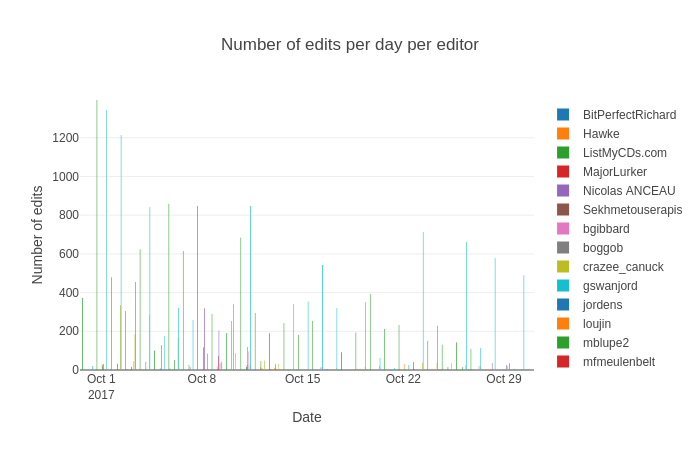
Our editor loujin made graphs with the amount of edits per editor during the cleanup. There are too many editors for the legend to show them all, but the graph shows that the two biggest contributors by far were ListMyCDs.com (green) and stupidname (light blue), with a bunch of other editors making several hundred edits as well.
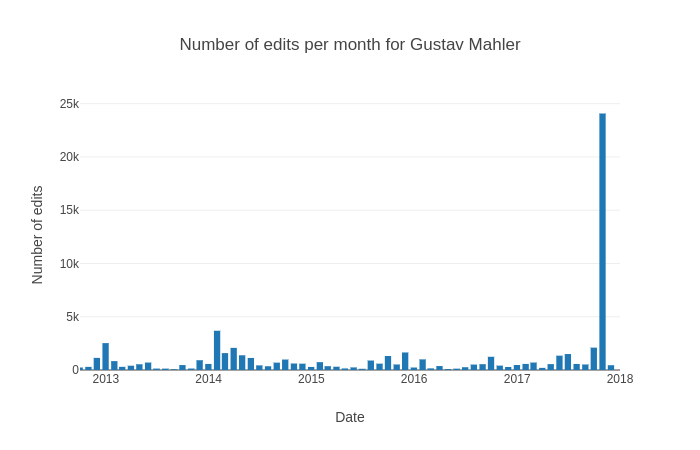
And finally, also thanks to loujin, you can see how the cleanup affected the amount of edits done on Mahler (no prizes for guessing which bar it is!):
Thanks to all this hard work, our entry on Mahler should be a particularly good example of the amount and quality of classical data you can get from MusicBrainz, and an inspiration for other composer pages! Thanks so much to everyone, and we’ll be back with more in December!

Mahler is impressed