
The Picard team is happy to announce the new major version 3.0 of MusicBrainz Picard, now available to download. MusicBrainz Picard is the official tag editor for the MusicBrainz database and helps you get your music collection sorted and cleaned up with data from MusicBrainz.
This release brings many changes, including an upgrade to Qt6, a completely new plugin system, several improvements to the user interface, cover art processing, ISRC submission and many more. More details below.
What’s new?
User interface improvements
Qt is the application framework Picard is built upon. Qt simplifies the implementation of cross-platform desktop applications as it abstracts away many of the differences between various operating systems. Picard 2 was based on Qt5. With Picard 3 we have updated to Qt6. Besides ensuring that Picard stays up-to-date and available on modern desktops, this version change also brings some advantages like much improved support for screen scaling and better support for a dark mode. Specifically on Windows the old issues of having fonts scale inconsistently are now resolved. The UI now also supports a dark mode across all operating systems and switching between light and dark mode does no longer require a restart of the application.
Picard already supported customizing the file and album list views by selecting the columns to display. In previous versions this was limited to a couple of pre-defined columns, though. New contributor knguyen1 implemented full custom column support. You can now define your own columns, where you can define the actual column content using scripting. This gives a lot of flexibility showing exactly the information you need. There is also a new pre-defined “Match” column that allows to sort releases by match quality. For more details see the chapter Custom Columns in the documentation.
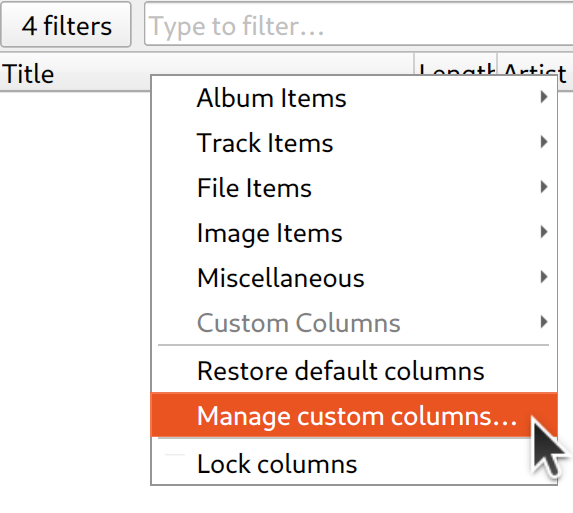
Another new feature, implemented by jpmsousa03, is the ability to filter the list views. You can select the fields to search and enter a search term. Only items matching this filter will be shown.
It is now possible to select and copy multiple tags in the metadata view and paste them on e.g. another tag, updating all corresponding tags. It is also possible to paste multiple copied values into a spreadsheet tool. This feature was provided by StevilKnevil.
The metadata view now also shows the actual differences between existing tags and the new tags being written.
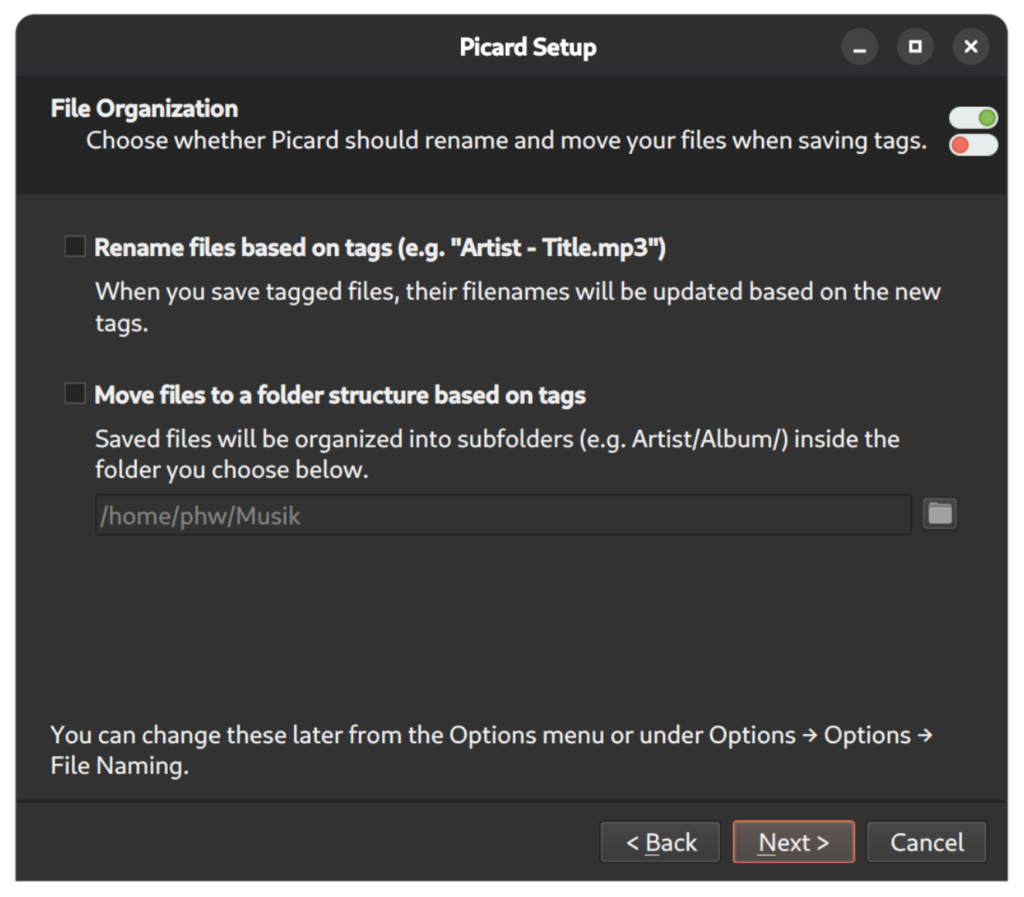
On a first start Picard now shows a setup wizard, that guides new users through some essential configuration.
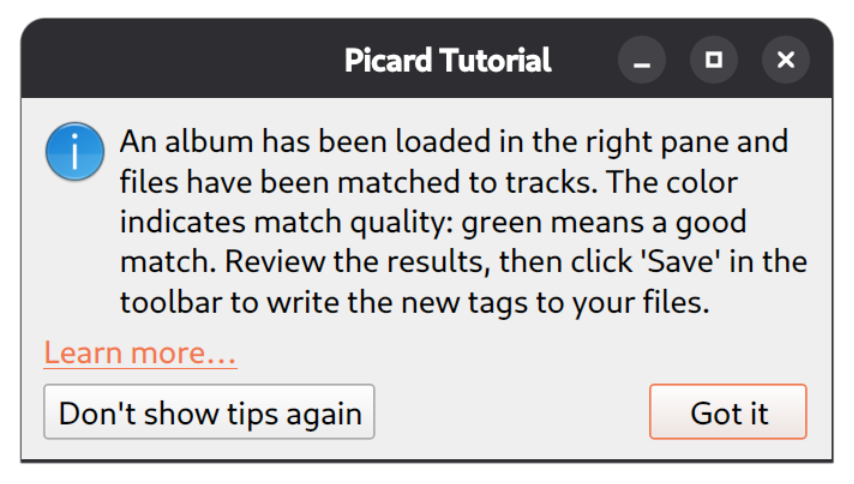
Also some essential functionality, such as loading files and clustering, gets explained by a tutorial mode when a feature is first used. Both the wizard and tutorial can be disabled or re-enabled in the user interface options.
New plugin system
Apart from the Qt6 migration the new plugin system is the most significant change in Picard 3. While the previous plugin system enabled a lot of flexibility in Picard, it has a couple of limitations. For example, Picard would load, and partially run, the code of each installed plugin on every start, whether the plugin was enabled or not. This could lead to unwanted side effects and unexpected behavior. On the development side it proved also difficult for third-party developers, especially for more complex plugins, as all code had to be checked into the central picard-plugins Git repository.
The new plugin system provides:
- Separation of plugin metadata and code:
MANIFEST.tomlis mandatory - A defined plugin API with typing support
- Git based versioning and updating of plugins
- Plugins can be installed and updated from a central plugin registry, from third-party Git repositories, or from a local directory
- Several trust levels (official, trusted, community, untrusted)
- The ability to blacklist plugins centrally allows us to react on security issues
- A
picard-clicommand line tool to manage (install, uninstall, update…) plugins - Plugins now support their own translation system (optionally manageable via Weblate), so their user interface texts can be translated
- Plugins have their own configuration namespace
All the extension points known from Picard 2 to register metadata processors, context menu actions, cover art providers, file formats, option pages etc. are still available. But there are several new extension points; plugins can now register cover art filters and processors, custom variables, actions in a global “Plugin Tools” menu and CD ripping log file formats.
As a user, the new plugin management under Options → Plugins now clearly separates installed plugins from plugins available for installation. Both the list of installed and available plugins can be searched, and it is possible to install plugins from third-party developers. See the Plugins Options documentation for a more in-depth description.
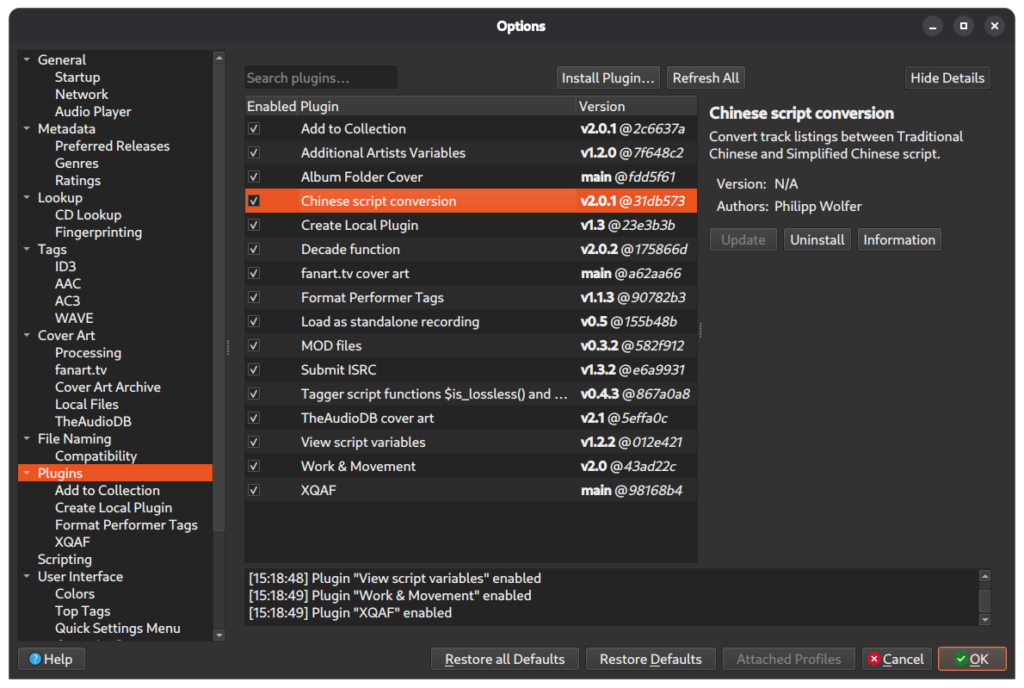
This also means that Picard v2 plugins are not compatible and need to be migrated to the new system. There are already 30 plugins available, both plugins migrated from v2 and brand new ones. Have a look at the plugins v3 list on the Picard website.
If you are a developer and want to update your plugins to Picard 3 or maybe write a new one, please see the Plugin overview in the Picard User Guide and the detailed Picard Plugin v3 Documentation.
Cover art processing
It is now possible to both filter and process cover art loaded from cover art providers. The new options in Cover Art / Processing allow you to ignore images below a certain size or automatically resize loaded images or convert them to a specific file format. Cover art processing can be extended by Plugins, which can register their own cover art filters and processors. Filters can restrict what cover art gets loaded, while processors can perform image processing on the loaded cover art.
Cover art processing was implemented as part of Google Summer of Code 2024 by twodoorcoupe. You can read more about this in twodoorcoupe’s blog post GSoC 2024: Picard image processing.
New tags and scripting enhancements
As full support for synced lyrics was added, there is now a new %syncedlyrics% tag. The MuicBrainz Artist ID of a composer is available as a new tag %musicbrainz_composerid%.
There are also several new variables, that provide data for tagging and naming scripts, but are not written as tags to the files by default. The new %_genres% and %_folksonomy_tags% variables give you access to the raw list of genres or folksonomy tags as loaded from MusicBrainz. For recordings with a broadcasted relationship the broadcasting date is available as %_broadcast_date%. If a recording has a linked work with a ISWC, the ISWC is now available as %_iswc%.
The variables %_albumartists_countries% and %_artists_countries% contain all country codes for all credited album artists / track artists. Likewise the disambiguation comments for artists and album artists are available as %_artistcomment% and %_albumartistcomment%.
The %_filesize% variable contains the file size in bytes (if the script is running in a context where a file is available, i.e. on tracks with a matched file or in a file naming script).
There are now two new functions $get_new() and $get_original(), which allow to explicitly request the original or new value of a variable. The $rsearch scripting function gained a new optional parameter, which can be used to specify the capture group inside the regular expression to be returned. Please see the documentation of the $rsearch function for an example.
Improved built-in player
The built-in player received several improvements. As before the player is based on QtMultimedia. With Qt6 this component brings better cross-platform support for various audio formats and pitch-adjustment if playback speed changes (requires Qt 6.10).
The player has also been internally refactored to better separate the player and UI. This allows better integration with the OS. The player now supports macOS “Now Playing” and on Linux can be controlled by MPRIS2 compatible tools. It can also submit listens to ListenBrainz. Both OS integration and ListenBrainz support can be configured in the new Audio Player Options.
Save and restore user session
Picard can save and restore your current workspace state as a session file under the main File menu. Sessions preserve file placement (unclustered, clusters, albums, specific tracks, and standalone recordings), your manual metadata edits, and selected configuration options so you can resume work later. Thanks to knguyen1 for this feature. See the chapter Sessions Management in the documentation for more details.
Export / import option profiles
Option profile support was already available in Picard 2. Option profiles allow you to create multiple different set of configuration options and quickly switch between them. With Picard 3 such option profiles now also can be exported and imported, both as a backup or to share them with others. If an option profile is exported in order to share it, the export will exclude any configuration options that are considered secret or private (such as authentication data). For details see the User Guide under Backing Up and Sharing Profiles.
Exporting and importing option profiles can also be done using the new picard-cli command line utility, see below.
We are excited to see how this feature will be used by the community.
Operating system support
Picard is now available for macOS ARM64 aka Apple silicon. While it was previously possible to run Picard on such systems using Apples Rosetta 2 emulation layer, the native builds offer better performance. Please note that there are separate downloads for the ARM64 and Intel versions of Picard. Please make sure to download the file appropriate for your hardware.
Due to the updated dependencies, in particular Picard now using PyQt6 / Qt6 and the minimum supported Python version being 3.10, support for older operating systems had to be dropped.
Picard 3 requires Windows 10 or later or macOS 13 or later. Linux users should have Qt 6.6 or later and at least Python 3.10 available.
CD disc lookup from tags and more log file import options
The existing functionality to lookup disc IDs from CD ripping log files was extended to support raw SCSI TOC data files as written by redumper.
For files ripped with iTunes / Apple Music and which contain the CD TOC as a iTunes_CDDB_1 tag it is now possible to perform a disc ID lookup directly from the tag. This is explained in detail in the User Guide under Lookup iTunes Tag.
Synchronized lyrics
Picard 3 provides initial support for synchronized lyrics. It can load and save a syncedlyrics tag from ID3 and WMA tags. The synchronized lyrics are using the LRC format to describe the timings. We plan to extend support for synchronized lyrics with future updates to support more tagging formats and lyrics features.
Translation of artist, release and track titles by aliases
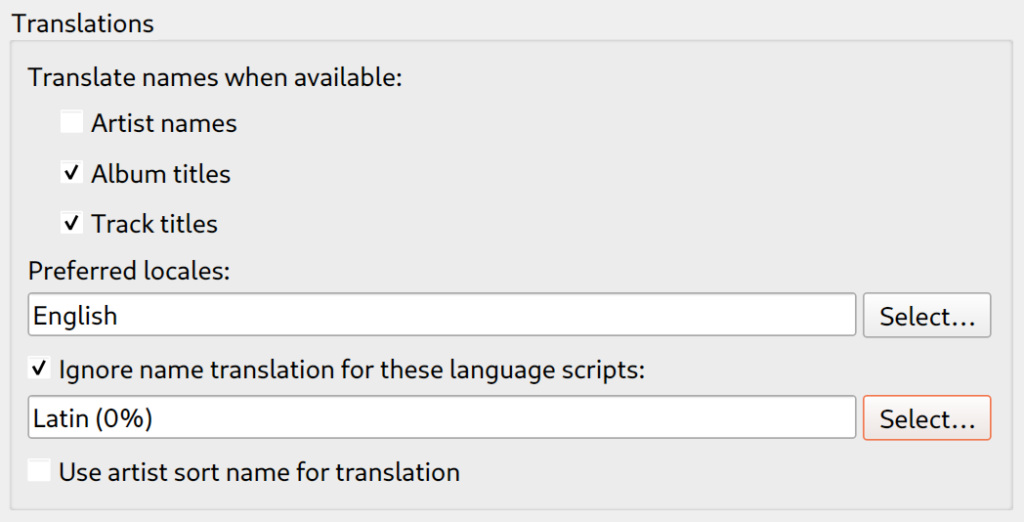
The existing system to translate artist names using aliases has been extended to also provide translations of album and track titles. Also the old behavior of always falling back to using the sort name as translation has been made optional and is now disabled by default. See the Metadata Options documentation for details.
Improved release matching
The algorithm for matching files to releases and recordings after a Lookup was totally reworked and greatly improved.
Overall we expect the new algorithm to give better results. There is now also an extensive test framework in-place that allows us to detect regressions in the matching performance in the future.
ISRC lookup and submission
Picard now supports extracting ISRCs from CDs and adding them to loaded releases. It can also submit ISRCs loaded from disc or already present in the tags back to MusicBrainz. If new ISRCs are present for matched files, the ISRC submission dialog can be opened from the menu in File → Submit ISRCs. For details see the documentation on Submitting ISRCs.
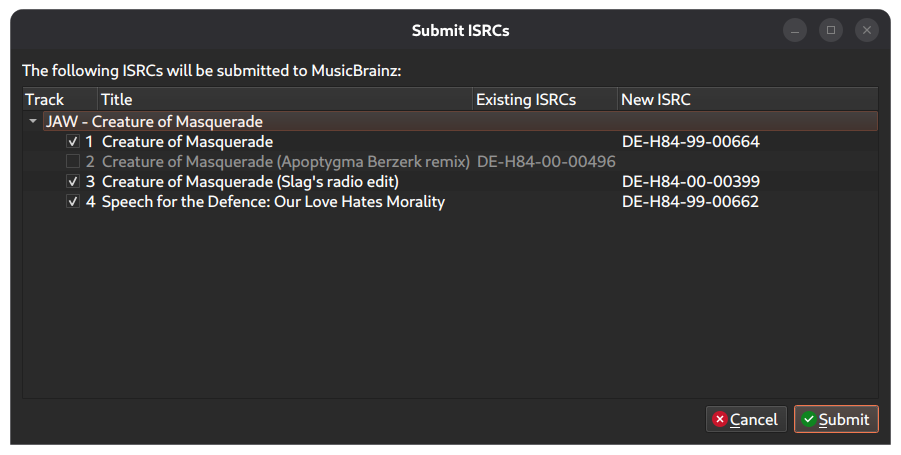
Individual files with an existing ISRC tag can also be looked up by ISRC using Lookup by… → Lookup by ISRC from the file’s context menu.
Command line utility “picard-cli”
Picard 3 comes with a new command line utility “picard-cli”. Currently this allows managing plugins and exporting/importing option profiles from the command line. Run picard-cli --help for more details.
Updated Picard User Guide
The online documentation available at https://picard-docs.musicbrainz.org has been updated for all of the changes in Picard 3. It is now hosted on ReadTheDocs and available in English, French and Dutch. When opening documentation pages from inside Picard the links will use the language matching Picard’s user interface language, if available. You can help translate the Picard User Guide into your language, see the instructions for Picard, Picard Website and Picard User Guide Internationalization.
Performance and memory optimizations
This release includes several optimizations to improve the speed and responsiveness of Picard during certain operations and to reduce memory use.
And more…
There have been many more improvements and bug fixes: Picard 3 is the product of roughly three years of work that began in late 2023 with the move to PyQt6: 687 merged pull requests, nearly 6,800 commits from over 100 contributors (including 40-ish translators), and almost 400 resolved tickets.
A good part of the code was rewritten, to ease maintenance and future evolution. Static typing is now used (but covering the whole code will take some time, we focused on important parts).
Test coverage is also much larger.
Please see the change log for a complete list of changes.
Download
Picard 3.0 is available for download from the download page of the Picard website.
Please note: For Windows users installing from the Windows Store the update to version 3.0 is not yet available. We will provide a Windows Store release with an update shortly. The Linux Flatpak package is maintained separately and will be updated soon.
Picard is free software and the source code is available on GitHub.
Acknowledgements
Getting this new major version of Picard ready was a huge effort, one that wouldn’t have been possible without the many contributors. Thanks to everyone who helped with code, translation or reporting issues and feature requests.
Code contributions by Adela Chang, Akshat Khatri, Anton Kesy, Arnab Chakraborty, Bob Swift, Bryan Roessler, David Kellner, Deepak Kumar, Francisco Lisboa, FRC, Goldmaster, Greg Myers, Deepak Tiwari, James Le Cuirot, joncrall, João Sousa , Julian Anderson, Kajal Soni, knguyen, krotka, Laurent Monin, Lctrs, leo60228, Marethyun, Martin, Martin Natano, metaisfacil, OscarL, Philipp Wolfer, pranavsource1, Rakim, ripstream, Sanskar Mittal, Alex, ShubhamBhut, soniikajal, Sophist, StevilKnevil, nullHawk, thekiefs, Thuna, Giorgio Fontanive, x11x and Yohay.
Translations were updated by:
Albanian: Besnik
Arabic: alaishaq
Catalan: Marc Riera
Chinese (Simplified Han script): imgradeone, KenParker_CN and Nebulain
Chinese (Traditional Han script): BestSteve, Iceman1415 and silentbird
Czech: Fjuro
Dutch: mfmeulenbelt, RandomMushroom128 and toineenzo
English (United Kingdom): glawie
Estonian: Priit Jõerüüt
Finnish: Jaakko Perttilä
French: Laurent Monin and rez00
Galician: ninjum
Georgian: NorwayFun
German: bababasti, chaban, Gsam3, janrieger, Philipp Wolfer and st.esser
Greek: Theo Asimakopoulos
Hungarian: hildgyorgy and pXF
Italian: GABG and salo.rock
Japanese: marudosurdo, RT2231, shuuji3 and zatto13
Korean: coldified_
Lithuanian: Vaclovas Intas
Malay: Jeluang
Norwegian Bokmål: “ApeKattQuest, MonkeyPython” and Metafono
Polish: ankhedonic, Echelon and Michal77
Portuguese: evarfino and joaodtx
Portuguese (Brazil): cristian_emanuel and vitortle
Russian: Dimlbur, wileyfoxyx and Wonordel
Spanish: deusdagon, Dino RTX, jaimeMF and Nicolás Tamargo
Spanish (Latin America): MichTheOcelot
Swedish: blueday
Turkish: brtc and dirt3009
Ukrainian: Arhidimon, emptybrainz, Nerten and oleh_hishak
Get in touch
Please use the MetaBrainz community forums and the ticket system to give feedback, suggest new features or report bugs.
Breaking changes
- Support for older operating system versions was dropped due to the update to Qt6 and newer Python versions. That means the minimum supported Windows version is now Windows 10, while for macOS you need macOS 13 “Ventura” or later. Users on older operating systems, who cannot or do not want to update their OS, should continue to use Picard 2. We plan to do at least one final Picard 2 release with important fixes to allow this version to be continued to be used.
- Not all plugins from Picard 2 are available. Several important ones have been ported, but some old plugins were unmaintained or do not meet the quality standards expected. If you miss a specific plugin you rely on please let us know in the community forums.
- The artist sort name by default is no longer used as a fallback to provide a “translated” name. The previous behavior resulted in several bugs being reported with wrong artist names after translation. If you relied on the old behavior you can restore it by enabling “Use artist sort name for translation” in the Metadata Options.
- Passing a parameter to the
$matchedtracks()scripting function now is an error. Previously it was possible to pass a parameter to this function (e.g.$matchedtracks(%artist%)), but it had no effect. - The lyrics and comments tags now always support a language, which is used when the tag is being loaded from or saved to ID3. The format is
lyrics:lang:description/comment:lang:description, wherelangis a 3 letter ISO code and description an additional descriptive text. If the language is being omitted, the separating colons are still mandatory, e.g.comment::description.
Known issues
- On macOS, in some setups, the global menu is not showing check marks for checkable menu items. It is currently unclear which exact setups are affected by this. If you experience this issue, please reach out with details on your macOS version (see PICARD-2509).
- Restoring a large session takes a significant amount of time and causes the UI to become unresponsive. We plan to improve this in future releases (see PICARD-3460).
- The
picard-clicommand line tool is not available on macOS when being installed as an app. However, it can be installed by installing Picard from PyPI.
Change log
Since the last stable Picard release 2.13.3 there have been 14 pre-releases for Picard 3. During the development we addressed 393 tickets to fix bugs, add features and improve existing functionality. Please see the detailed change log on the website for a full list of changes.
Cheers, I can now resume tagging my collection which has been waiting since… 2023.
Finally I can throw away my picard 2 based synchronized lyrics branch … thx a lot
WOOHOO!! 🥳❤️🥳
Just installed, was a wonderfully smooth upgrade from 2 and looks like all my settings carried over! Can’t wait to integrate all the new features into my regular tagging-flow.
Amazing work by all the MusicBrainz Picard developers, thank you very much