
Helloo Everyone!
My name is Yateen, a final year cse student at Indian Institute of Technology Jodhpur. My matrix username is (@yateen) and GitHub. I started open source at the beginning of this year. I was selected as a GSoC contributor and worked on the Playlists Sorting and Organization project. It was a wonderful experience working on a tech stack of React, Databases, APIs, Jest + Testing Library, etc. What was more amazing was to work under the mentorship of Ansh Goyal (Github), Monkey (Github) and Jade (Github) and be a part of the wonderful MetaBrainz team.
Pre-selection Contributions
Before GSoC officially started, I contributed to ListenBrainz through several smaller PRs that helped me learn the codebase and review process. Firstly I started with exploring some small UI/UX issues such as preventing duplicate error toasts and fixing toast overlap with the YouTube player, accessibility improvements like adding aria-labels to icon-only playback buttons. Then I started solving tickets which are feature-oriented like including auto-save for settings, showing artist name relationships. This pre-selection period helped me get comfortable with ListenBrainz patterns and mentor feedback before taking on the larger GSoC features.
Project Overview
Over the summer I worked on the playlist features and improved the existing playlist structure. I shipped four related features that turn ListenBrainz playlists from a flat list into something you can search, tag, sort for listening, and import from MusicBrainz collections.
Feature 1 – Playlist Search
The first thing I tackled was search on the user playlists page. If you had a lot of playlists, finding one usually meant scrolling forever or jumping over to global search.
I started with a simple search bar wired to the existing user playlist search API: type at least three characters, hit search and get matching playlists back with pagination. But there was a problem with it especially once you mixed search with sorting and paging.
Ansh suggested to treat search like the rest of the playlists pag: put the query in the URL query parameters and load data through the route loader . The main issue now was the search results were automatically sorted before getting displayed with the existing sort option (Date Created, Date Modified, Title, etc.) which doesn’t provide a good search experience. So I introduced a way for search results to default to “Best Match” while a search is active and later you can sort by date or title and get a consistent order across pages. I also added small but important pieces – loading state while rendering and empty messages when “No playlist found“.
Feature 2-Tagging Playlists
Search helps when you remember a name. Tags help when you remember a use/category: gym, road trip, focus, whatever. ListenBrainz didn’t have real playlist tags yet. Playlists already had additional_metadata, but we needed a proper structure to organize them with tags.
On the backend, I added a playlist_tag table in admin/timescale/create_tables.sql, with normalization (lowercase, trim whitespace, length limits). Each tag ≤ 40 chars, you can add up to 25 tags per API call; a playlist can hold at most 50 tags overall, and only the playlist owner can add/remove. Collaborators can see tags but can’t edit them.
Tags show up in playlist JSPF when we need them for the UI, and there’s a sidebar endpoint that returns each tag with how many playlists use it, separately for owned vs collaborative playlists. Filtering supports multiple tags, and it works together with search.
Table
Table: playlist.playlist_tag
| Column | Type | Notes |
|---|---|---|
| id | SERIAL | Primary key |
| playlist_id | INT NOT NULL | FK to playlist.playlist(id), ON DELETE CASCADE |
| tag | TEXT NOT NULL | The tag string |
| created | TIMESTAMPTZ | Defaults to NOW() |
UNIQUE (playlist_id, tag) — same tag only once per playlist
On the frontend, you can add tags when creating or editing a playlist, see them on playlist cards and on the playlist page, and filter from a sidebar. Active tags filters are included in the URL (?tag=…), so they combine cleanly with the search and sort features.
Designing the UI for the tags sidebar was a bit challenging. I consulted with Aerozol, Ansh and Monkey and finally came up with a UI which reuses the existing components from Listenbrainz.
BEFORE :
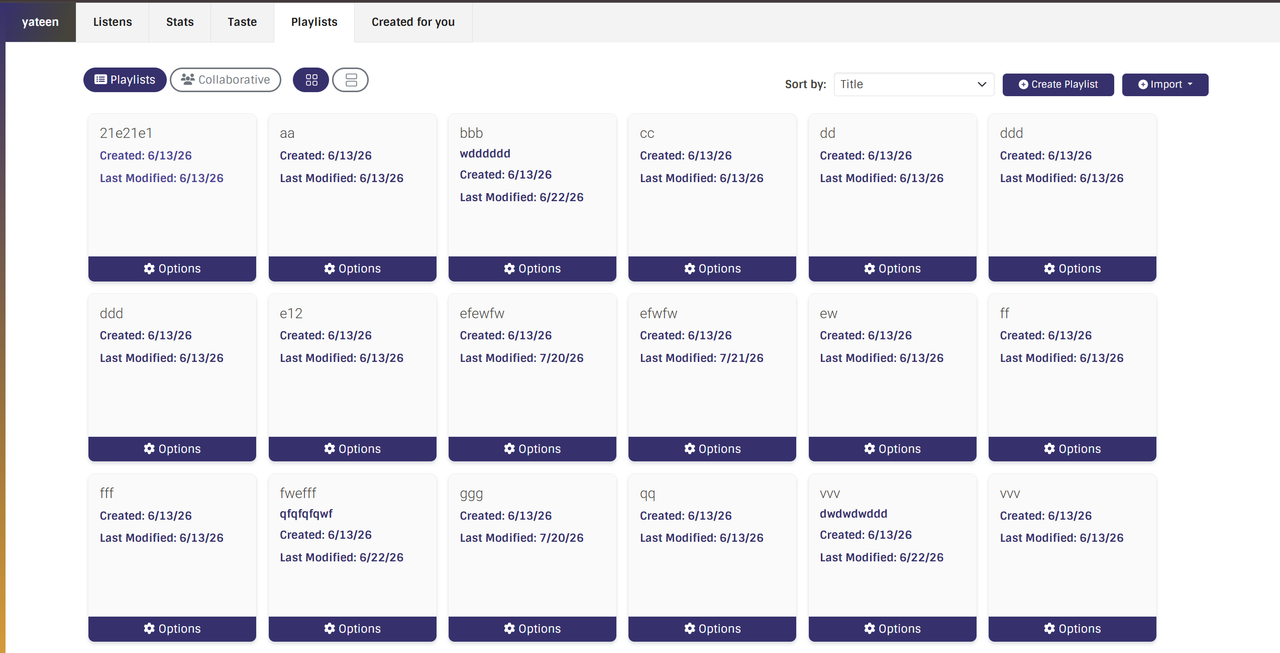
Main playlist page without tags sorting
AFTER:
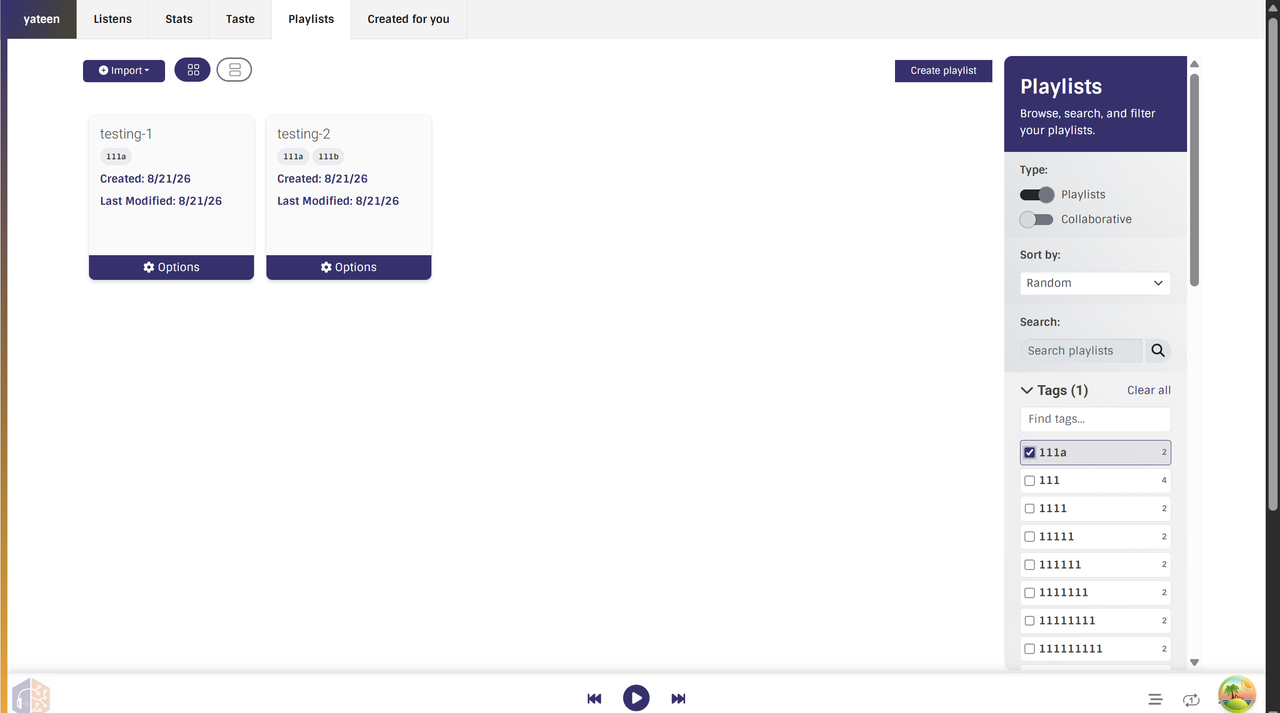
Playlists sorted by tags
Feature 3 – Sorting tracks inside a playlist
After search and tags, the next issue was browsing tracks inside a playlist. Tracks always showed in the saved order. That is fine for editing, but not always for listening. Sometimes you want A–Z, by artist, newest first, or shuffle, without changing the playlist forever.
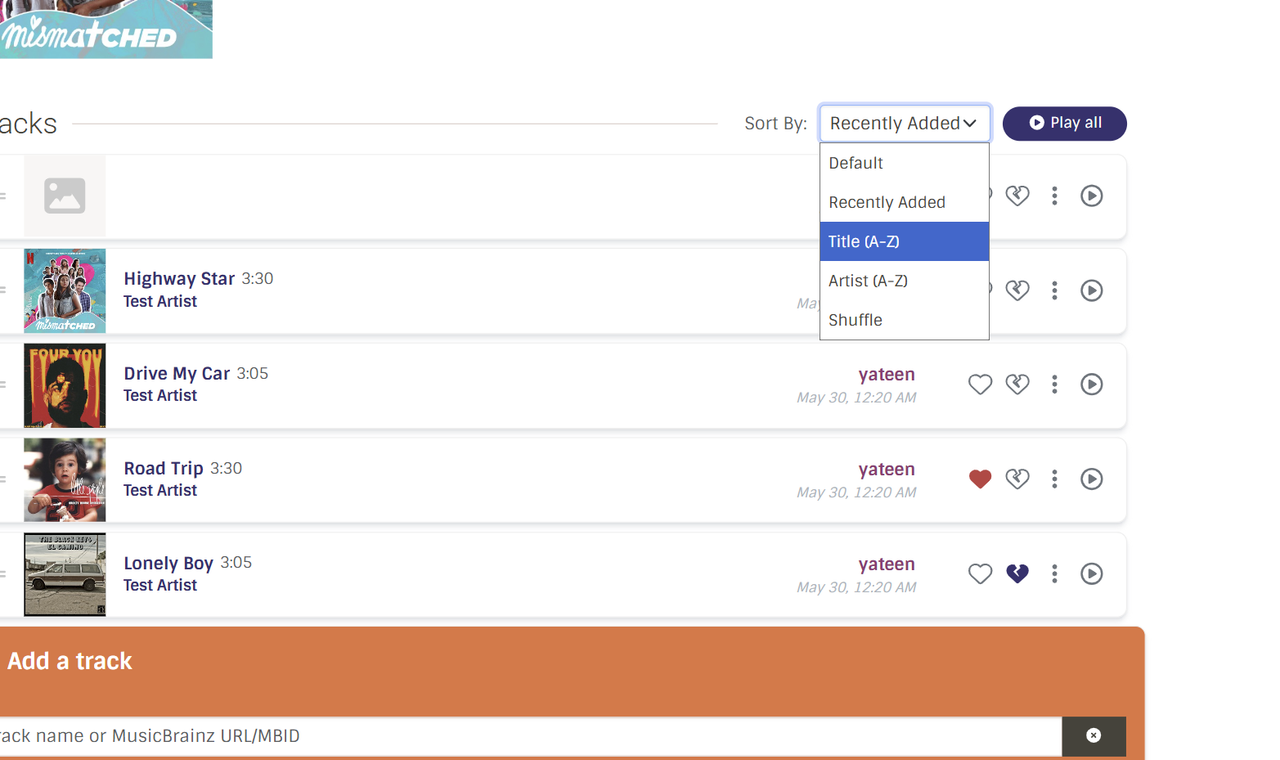
So I built this only on the frontend. On the playlist page, there is a “Sort by” menu next to Play all. Options are Default, Recently added, Title, Artist, and Shuffle. Default is the real saved order. Drag and drop works only in Default, while other sorts are temporary.
For Shuffle, if you add or remove a track, the list does not reshuffle again. Play all also uses the order you see on screen. This was a smaller feature than search or tags, but it made long playlists easier to use.
Feature 4 – Importing Musicbrainz collections
ListenBrainz already imported playlists from Spotify, Apple Music, and SoundCloud, but not from MB itself. The goal was to preview MusicBrainz collections in ListenBrainz and optionally save them as normal ListenBrainz playlists .
Recording collections first
We started with recording collections. Instead of calling the MusicBrainz web API, we read live from the MusicBrainz database using MB_DATABASE_URI.
On the backend:
GET /1/playlist/import/musicbrainz/collectionslists the logged-in user’s collections./collection/<mbid>/shows the collection page which follows the same SPA pattern as other ListenBrainz pages .GETreturns the HTML shell, andPOSTreturns the JSON data.- Public collections can be viewed by anyone. Private collections are only for the owner, checked with their MusicBrainz editor id.
On the frontend:
- A MusicBrainz option was added to the import modal. Clicking a collection opens a preview page where tracks load in pages of 100, with virtual scrolling for large collections. The page also supports cover art, Play all, and Save as playlist. Saving uses the existing playlist create API (
POST /1/playlist/create). - After mentor review, we improved the page to better match ListenBrainz patterns. The first page of data now loads through
RouteLoader, more tracks are fetched withuseInfiniteQueryinstead of a hand-written fetch loop.
Release Collections
Now on the preview page, a release collection does not show a flat list of tracks. It shows the releases themselves — title, artist, and cover art when available. Clicking a release opens the ListenBrainz release page at /release/<mbid>/, so the user can explore that album in the normal ListenBrainz UI.
Saving works a bit differently from recording collections. A release collection is not already a list of recordings, so the backend flattens each release into its tracklist. The frontend requests this with ?flatten=tracks on the collection page. That query walks the MusicBrainz release → medium → track → recording path and returns normal recording rows. Those rows are then sent to the existing playlist create API, so the final result is a normal ListenBrainz playlist that you can play, edit, and manage like any other playlist.
Testing
Writing tests was one of the biggest learning curves for me this summer. Before GSoC, I mostly checked features by hand and did not have a strong habit of adding tests. Working on ListenBrainz changed that. Mentors often asked for coverage of edge cases, auth rules, and validation paths, so writing tests became a normal part of finishing a feature.
For each feature I used a mix of both manual checks with automated tests:
- Frontend tests in
Playlists.test.tsxfor playlist search. - Integration tests in
test_playlist_api.pyfor tags. - Frontend tests in
Playlist.test.tsxfor in-playlist sorting. - Integration tests in
test_musicbrainz_collections_import.pyfor MusicBrainz collections.
Overall GSoC Experience
GSoC with MetaBrainz was my first time working on a large open-source project with real users and a real review process. I learned a lot more than just writing features. Mentors pushed me to think about URL state, loaders, error codes, empty states, and tests — things I used to skip or only check by hand.
I would like to thank Ansh, Monkey, Jade for guiding me throughout the process . I learned professionalism from them and their dedication to their work motivates me to improve my own. I realized that handling such large organization with limited members requires high skills built on strong fundamentals and obviously a problem solving mindset is must . I would also like to thank Aerozol for helping me in UI related issues.
What feels most rewarding is knowing the work I shipped will remain in the project and will be used by users across the world.
My PR’s around the GSoC period and Proposal can be found here – PRs
Post GSoC Plan
I plan to take a short break and then with fresh energy again start contributing to ListenBrainz and other MetaBrainz products. My next steps will likely include polishing the playlists further and solving other tickets so I stay active in the community (I love Monday meetings 🙂). Long term, I hope to keep growing as an open-source contributor and continue improving ListenBrainz.
